
If you’re already heavily invested in MarTech, you might wonder where you might integrate a CDP in your MarTech stack, and how you’d use it with all your existing marketing technology. The need for a customer data platform (CDP) is clear: Companies need to provide a unified, consistent experience and single customer view in all channels. To do that, they need to combine customer data across silos to get a complete picture of the customer’s relationship with the company.
A customer data platform connects these data silos and helps provide consistent experiences across all touch points and channels. But when it comes to the CDP, people are often confused about where exactly it fits into the MarTech stack, along with other data management solutions, like a customer relationship management (CRM) platform, data lake, or a data management platform (DMP).
According to David Raab, CEO of the CDP Institute, in a webinar on the subject, the confusion is understandable. After all, the CDP Institute tracks 208 CDP vendors as of January 2026, and they are not all the same. So it’s time to step back, look at the big picture, and figure out where and how the CDP fits into your MarTech stack to provide centralized data management capabilities other platforms cannot quite match.
CDP Integration: The Big Picture
There is one thing all true CDPs do: they build unified customer profiles, sometimes called single customer views (SCVs) or golden profiles. Everything else a CDP does stems from that single critical capability.
But there’s more to a CDP than just building a unified profile. Let’s look at all the different features customer data systems can offer.
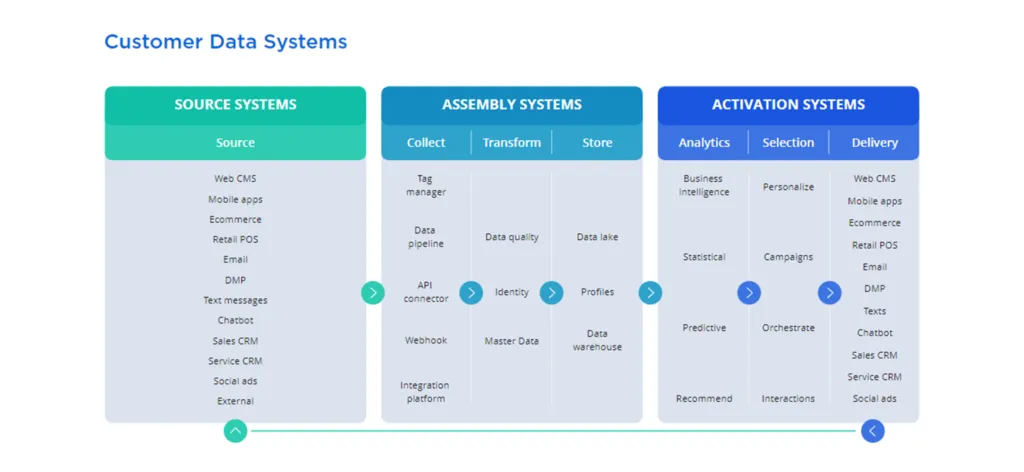
Most companies have a number of systems that manage some type of customer data, and they fall into three broad categories:
- Source Systems: Systems that capture data directly (website, email, CRM, DMP, etc.)
- Assembly Systems: Systems that ingest customer data from original sources and assemble profiles (including data collection, transform, and store data)
- Activation Systems: Systems that use assembled data (analytics, message selection, delivery)
Quick Tip: Point Solutions are not CDP Solutions
Some end-to-end point solutions look like a CDP, but they aren’t. For example, an email solution might add features across the assembly and activation categories. It might even add in an additional data source, but mostly it creates another data silo, not a unified profile.
The Minimum Viable CDP
Remember, all true CDPs build a shareable customer profile that is unified, persistent, and comprehensive. This unified profile can serve as the single source of truth across an organization regarding a customer, so the entire company is in sync on the data and persona they are modeling against.
Per the CDP Institute, a CDP is defined as a “packaged solution,” which means it provides additional capabilities that help marketers assemble and activate data across all channels. CDPs are the only system designed and optimized for this purpose.
A minimum viable CDP must have a particular set of features that fall into the assembly category, including:
- Data pipeline and API connection for collecting data
- Data quality for transforming data
- Data lake and profiles to store data
But this is just the start of what a CDP can do.
Beyond the MVP: 6 Core Capabilities of CDPs
It’s easy to get lost with hundreds of CDPs in the market, all coming from different origins, all with varying features. Although some meet the minimum viable CDP feature set as defined by the CDP Institute, others go beyond and are more sturdy enterprise-grade platforms for global omnichannel marketing requirements. CDPs will have capabilities from some or all of these six areas.
- Data CDP capabilities: May come from tag manager legacy software. Include data lakes, data pipeline, profiles, data integration capabilities.
- Analytics CDP capabilities: May have predictive models, recommendations, and business intelligence.
- Campaign CDP capabilities: Includes personalization, orchestration, and campaign management features.
- Delivery CDP capabilities: Sending messages to channels for activation.
- Operational CDP capabilities: For optimizing and management of business processes and message delivery.
- Enterprise CDP capabilities: An enterprise-grade CDP has all of the capabilities mentioned above in a single package, and is built from ground-up as a dedicated centralized data management solution with APIs for connectivity and interoperability.
Connecting data silos using a CDP and providing additional features across assembly and activation benefits companies in two ways. First, it enables marketers to make more profitable decisions because they have that complete, accurate view of the customer and their interactions with the company. And second, it helps reduce costs by eliminating duplicate functions across systems.
Learn more: 10 Capabilities You Need in an Enterprise CDP
Find the Right CDP for You
Before you begin the process of selecting a CDP, you should ask yourself some key questions:
- What do you want to accomplish?
- What’s stopping you from doing it?
- What CDP use cases should you focus on to achieve your goals?
- Is a CDP the best solution to meet your goals?
Once you understand your business objectives and see where the gaps keep you from achieving them, you can decide if a CDP is what you need. By mapping out your use cases, you’ll see what CDP features you need, which will help you decide what type of CDP to purchase. It will take a bit of work, but in the end, you’ll end up with the right CDP for your needs.
For more information, you can download the whitepaper, “Where CDP Fits In Your Tech Stack” from the CDP Institute and Treasure Data. It covers how CDPs compare to DMPs, Master Data Management, Data Lakes, CRM and other systems.
The integration sequence: where CDP projects actually fail
The stack diagram tells you where a CDP sits. It does not tell you the order to wire it in, and the order is where integrations go wrong. A CDP connected out of sequence does not fail loudly — it quietly assembles profiles nobody trusts, and every team downstream models against them anyway.
Work the sequence in this order:
- Classify your systems before touching anything. Sort every system that touches customer data into the source, assembly, and activation categories above. The output is not a slide; it is the list you will connect from, and it usually reveals two or three systems duplicating the same job.
- Define the profile schema before the first connection. Decide which fields make up a profile, which identifier wins when two systems disagree, and which events count as the same action across sources. Include consent and preference state from day one — retrofitting consent onto a year of assembled history is far harder than collecting it correctly from the start. Teams that skip this step inherit every source’s formatting quirks, and fixing them after load means reprocessing everything.
- Connect the sources your first use case needs, and only those. A first integration built on web behavior, purchases, and email engagement proves the pipeline faster than connecting every source at once, and it surfaces identity problems while the blast radius is small.
- Wire one activation end to end before adding more sources. Pick one destination — an email platform or an ad audience — and push a real segment through it. A profile store with no live activation is a data lake with better marketing, and activation is where data quality problems finally surface.
- Write down the operating rule. Name the team that owns profile schema changes, the process for adding a source, and who gets called when a sync breaks. Without it, six months later nobody knows why a field changed or which system is authoritative.
The same failure modes repeat across companies: profiles assembled before identity rules were set, so the same person exists three times; sources connected by org chart instead of by use case, so data nobody activates still costs money to move; and schema changes made silently in one system, breaking a downstream audience nobody remembered was live. None of these are CDP product problems. They are sequence problems, and they are avoidable in week one.
Choosing how each system connects to the CDP
The sequence gives you the order; each connection still needs a pattern, and the pattern determines how fresh the profile is and how it fails. Four cover nearly every CDP deployment:
| Connection pattern | Best for | Typical latency | Watch out for |
|---|---|---|---|
| Prebuilt connectors | Standard SaaS sources and destinations — CRM, email, advertising platforms | Minutes to hours | Connector coverage decays; a destination that silently drops a field truncates every profile it touches |
| Event APIs (streaming) | Behavioral data from properties you control — web, mobile apps, checkout | Seconds | Every custom event becomes schema you own; unmapped events pile up as unusable data |
| Batch files | Back-office, legacy, and partner systems that cannot stream | Hours to a day | Nightly loads hide staleness — every profile is up to a day old, which stays invisible until a campaign acts on it |
| Warehouse-centered sync | Teams whose customer analytics already live in a cloud data warehouse | Hours, on the warehouse’s schedule | Two profile stores drift apart unless one system is named the source of truth for each attribute |
Two rules keep the choice honest. First, match the pattern to how the data changes, not to what is fastest to switch on: behavioral events lose value by the minute, while a billing address rarely changes fast enough to justify streaming infrastructure. Second, for every attribute, name the one system whose value wins, then configure the other patterns to defer to it. The expensive failure is not picking the wrong pattern — it is running three patterns at once with no owner, so the same attribute arrives by stream, by batch, and by warehouse sync, each carrying a different value. When that happens, every downstream team quotes whichever value suits its argument, and the unified profile is unified in name only.
Where the CDP sits when AI agents run the campaigns
The newest entrants to the MarTech stack are agentic AI systems that select audiences, draft messages, and trigger journeys with limited human oversight. They change the CDP’s position in one specific way: the unified profile stops being a report for people and becomes an instruction set for software. An agent does not open a dashboard and interpret segments — it reads the profile at the moment of decision and acts on what is there, accurate or not.
That raises the stakes of everything earlier in this article. A stale consent flag was once a finding in a quarterly audit; with agents acting on profiles, it becomes an outreach to a customer who opted out — automatically, at machine speed. Suppression lists, frequency caps, and channel preferences are no longer documentation; they are constraints the profile has to enforce at the moment an agent acts.
This is where the agentic CDP concept comes from: profiles built to be queried and acted on by autonomous systems through governed interfaces, with every agent action written back to the profile as new data. The write-back matters as much as the read. An agent that acts on the profile but never updates it optimizes against a snapshot that decays from the moment it goes live. And because agents compress the time between a data problem and its customer impact, agentic personalization inherits every identity and quality shortcut taken during integration, at whatever speed the agent runs.
For stack planning, the takeaway is simple: position the CDP as the layer agents read from and write to, run it through the same integration sequence, and treat profile governance as the control surface for AI-driven marketing. The diagram barely changes. The cost of getting it wrong does.
FAQ
Do you still need your CRM and marketing automation platform after adding a CDP?
Yes — the CDP assembles the customer profile; your CRM and marketing automation platforms remain the systems that act on it. A CRM holds the record a sales team works from, and a marketing automation platform sends the campaigns; neither unifies data from every source. The CDP feeds both a resolved, persistent profile, and their engagement data flows back in. Removing them after a CDP lands recreates the silo problem the CDP was bought to solve.
Should the CDP or the data warehouse be the source of truth for customer profiles?
Neither system owns everything: give the CDP authority over engagement-facing profile attributes and the warehouse authority over historical records. The warehouse is built for analytics at scale; the CDP is built to serve a resolved, current profile to channels and to AI agents. Collisions happen when both assemble the same attribute and no one has named which value wins. Map ownership during profile schema design — before the first sync — so neither system silently overwrites the other.